Integration Layer
What’s on this page?
- Integrating with the Tulip Cloud Platform
- Types of Data Entities Tulip Can Synchronize
- Plan for Data Integration with Tulip
Tulip is a purely connected and data-driven application. Tulip brings years of research experience in presenting an associate with rich product details, customer profiles, and transaction history data that is laid out in an intuitive format. Thousands of Tulip users across numerous brands across the world enjoy having context-aware and personalized conversations with their customers.
Designing an integration with Tulip depends on a couple of factors:
- Type of data entities being synchronized (such as Products or Customers),
- The specific vendor partner/system that serves as the master source of record for the data (such as Oracle Relate as CRM or Digital Product Master); and
- The integration capabilities within the client’s ecosystem (such as IBM Integration service bus, or Mulesoft platform for integration layers).
Tulip provides a flexible set of APIs and tools, and an integration platform of its own, so clients can synchronize data and extend deep integrations into existing infrastructure and environments.
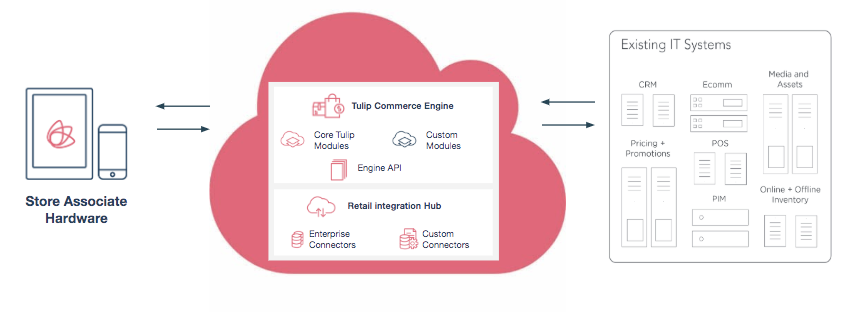
The Tulip Platform integrates with a retailer’s cloud or on-premise systems through Integration Builder, together with the APIs, file and webhook paths it builds on. This supports a breadth of capabilities for data synchronization between Tulip and client systems, and lets partners and clients choose the integration pattern that suits each feed.
These capabilities are designed around industry-proven patterns and best practices, and run as a highly available, secure integration layer for inbound and outbound data.
Tulip has extensive experience building connectors to best of breed retail OMS, CRM, POS, and PIM solutions.
For more information on different integration methods available from Tulip, see Integration Methods.
Integrating with the Tulip Cloud Platform
At Tulip, the main integration patterns for data synchronization with client systems falls under the following two categories:
- Caching all applicable Retail data within Tulip's cloud backend to ensure the app is able to access information quickly from Tulip Cloud when needed. And to be able to relate entities for task creation, linking entities (sharing products, adding customers to orders etc), as well as usage analytics.
- Updating Client's master systems during specific use cases when a synchronous update/creation of a key data point is to be applied (e.g. a Customer profile).
Access to cached copies of the retail data entities enables Tulip to persist data securely and access it through defined APIs, which do not need to be customized each time for a different implementation, thereby speeding up the implementation timeline. Moreover, the indexing of information on Tulip’s cloud platform makes it possible to search the static information (images, key values for products for instance) in the fastest manner possible.
Types of Data Entities Tulip Can Synchronize
Tulip can synchronize the following data entities:
- Catalog - Including product details, categories, images and their translated equivalents to drive cross region localized behavior
- Prices - Localized prices per regions, countries or stores
- Inventory - Near real-time inventory availabilities
- Customer - Tulip stores customer profile data securely while complying with major information systems and compliance standards
- Order History - Past customers purchases data within client’s environment
- Associates - Information about associates from each store
- Stores - Information about each store
- And many others to enable rich Clienteling features!
Plan for Data Integration with Tulip
Tulip will work with client Business and IT team counterparts to align on how to empower Tulip with data from client master systems.
We encourage leveraging existing data integration practices and data-interchange mechanisms already in place within client cloud or on-premise infrastructures to synchronize data with the Tulip Platform.
Here are a few things to consider when determining the integration approach
- Depending on the use cases that the client wishes to enable in the store experience, outline the systems that will source the key data entities. For example: Customer record, Product and Variant, Pricing and Inventory (Online and store specific) records etc.
- Consider aligning with the Tulip data formats for file-based or API-based integrations.
- Outline partner systems that are not directly managed by client IT teams, but persist data in client partner remote cloud systems that will power Tulip. There is a good chance Tulip already integrates with those best of breed partners in other implementations. These could include POS systems, customer intelligence and task assignment systems (for store associates), retail PIM or commerce digital systems, etc.
- Determine the cadence of data synchronization for major entities. Tulip recommends a once a day synchronization for static data entities like Products, Prices, Variants, Associates and Stores; near real-time sychronization for Customer updates, Inventory values; and synchronous real time data interfaces to Transactions (Payment and Checkout) use cases.
Later sections of this documentation explain current methods available for clients to integrate data to and from Tulip.
Integration Methods
Most integrations today are built and run in Integration Builder, Tulip’s own integration platform. It does not replace the methods below so much as orchestrate them: one workflow can call a client API, collect a file, reshape and validate the data, and load it into Tulip — on a schedule or the moment an event fires, in either direction, with no custom middleware to build or host. See Integrating with Tulip for help choosing an approach, and Planning Your Integration for the data Tulip needs.
The underlying methods it draws on, and which clients can also use directly, are:
- File-Based Integration Method
- RESTful APIs Integration Method
- Connector (Middleware) Integration Method
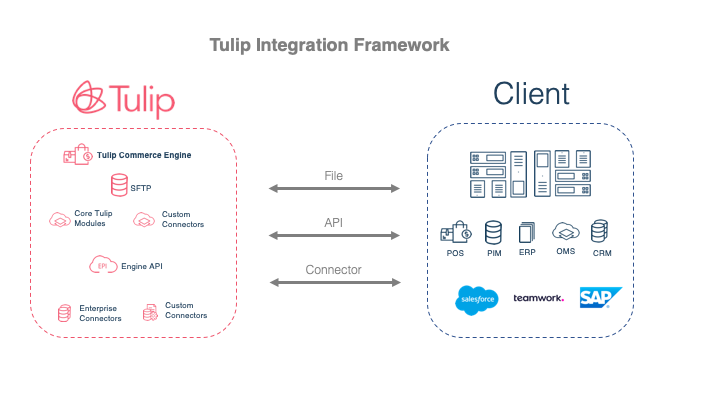
In the following sections, each method is described with real scenarios at Tulip.
File-Based Integration Method
Clients send simple and standard CSV or JSON formatted files to import data to Tulip platforms. Currently, Tulip provides certain file formats that clients can use to send their data. The file is stored in SFTP servers and automatically imported to Tulip overnight.
Examples include importing information about Stores, Products, Variants, Prices, Inventory, Employees, Customers, etc.
For details, see File-Based Direct Integrations.
RESTful APIs Integration Method
API integration refers to the method where clients use Tulip-provided endpoints using RESTful API calls to interact with Tulip Apps. Our Bulk API and Direct API are the components provided for such capabilities.
For details, see API-Based Bulk Integrations.
Connector (Middleware) Integration Method
Connectors (or middleware) refer to applications that link Tulip to a client’s cloud-based software systems. Clients run a diverse set of software, and Tulip integrates with many of them to move data inbound and outbound.
This is the method Integration Builder replaces for most clients. Instead of commissioning a bespoke connector, or licensing an external integration platform to sit between the two systems, the connection is configured in a visual builder: choose what starts it, point it at the source, map the fields — with AI drafting the mapping from a sample or a live endpoint — and let it run. Anything reachable over HTTP can be a source, including cloud data platforms such as Snowflake, Databricks and BigQuery through their own APIs.
Tulip also offers purpose-built connectors where a platform warrants one, such as the Shopify connector. Where a client already runs their own integration platform, that still works: it can call a workflow’s authenticated Run URL, or exchange files and API calls with Tulip directly.